PromptGo · Product case study

Your best prompts.
Ready when you are.

A Chrome extension that helps frequent AI users save, organize, and reuse prompts within their workflow.

My role
Co-founder · Product lead · Builder
Team
Product + engineering partnership
Status
V1 published · V2 in progress
PromptGo logoPromptGo

Click. Paste. Go.

  1. 01Save

    Keep a useful prompt.

  2. 02Find

    Retrieve it when you need it.

  3. 03Insert

    Bring it into your AI workflow.

01 / THE STARTING POINT

A useful prompt.
Now, where do I keep it?

The idea began with a study prompt from my psychology professor, who was researching how AI prompts could support student learning. I was excited to use it, but immediately wondered how I would find and use it again.

Another Google Doc would add to an already scattered collection. Searching old documents and manually copying prompts into an AI chat felt unnecessarily cumbersome.

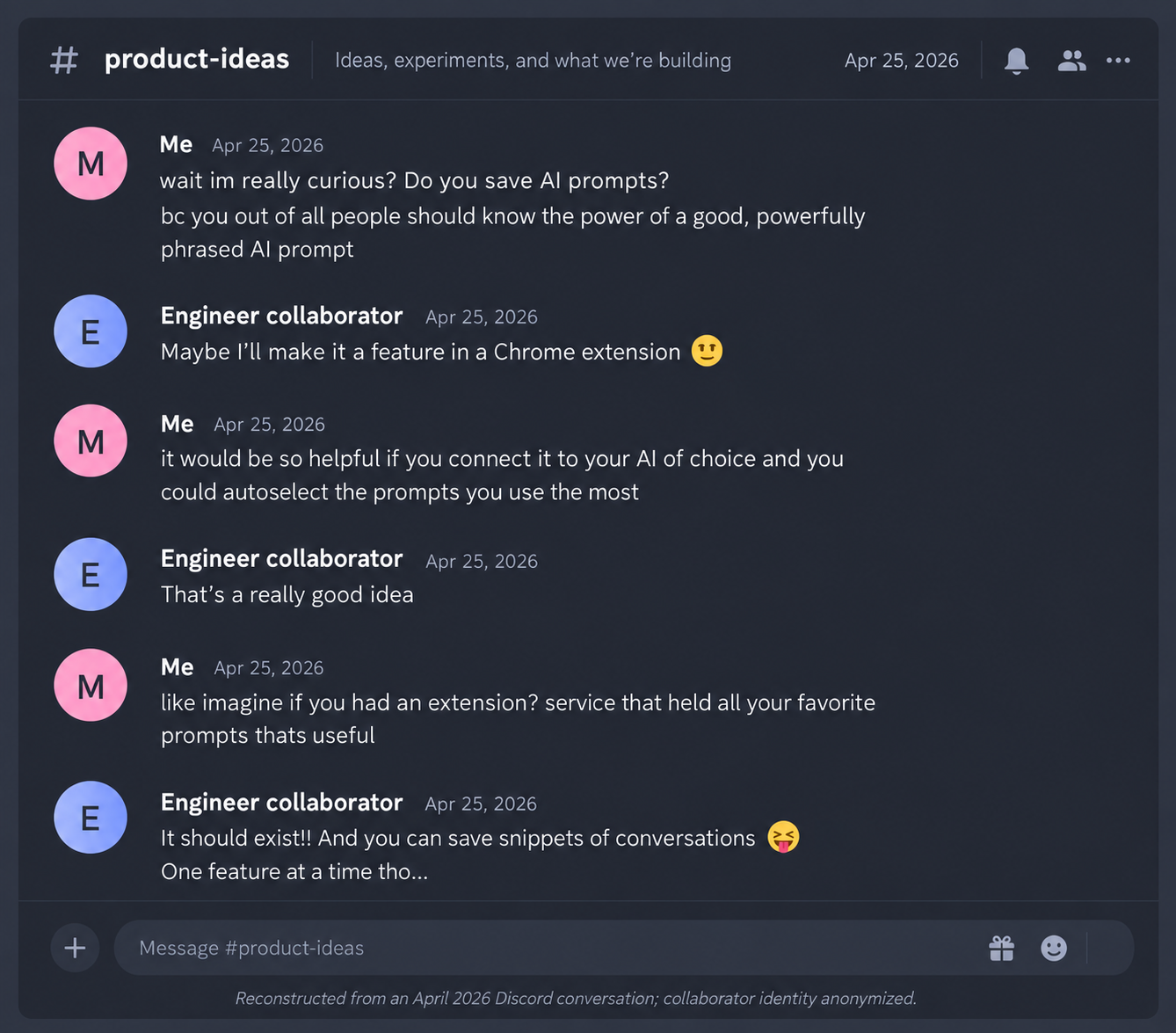
During a late-night Discord conversation, I asked a software engineer friend how he used and organized prompts. He described similar difficulties. That informal discovery conversation became the starting point for building PromptGo together.

THE SPARK

A reusable study prompt.

A prompt from my psychology coursework made me realize I had no good place to store and retrieve prompts I wanted to use again.

“I will write down everything I can remember about the attached lecture. Please:

  1. Provide feedback on areas that are incorrect or need clarification.
  2. Expand on my points with additional details from the lecture.
  3. Highlight any important concepts or categories from the document that I missed in my notes.”

A prompt I wanted to reuse — but where do I keep it?

FIRST SIGNAL

A conversation that turned a frustration into an idea.

I asked an engineer collaborator how he saved and organized prompts. The conversation helped turn the frustration into a product hypothesis.

Sanitized reconstruction of an April 2026 Discord conversation about saving and organizing AI prompts

Reconstructed from an April 2026 Discord conversation; collaborator identity anonymized.

02 / USER RESEARCH

Real people. Real workflows.

To understand how people actually work with AI, I conducted in-depth interviews with frequent AI users. My first interview was with a product and visual designer (Participant 01) who uses AI daily for both creative and professional work.

01

Fragmented workflows

Used Apple Notes, Notion, ChatGPT Projects, and MD files for different types of prompts.

02

Already built workarounds

Had created a personal system with folders, galleries, branches, and JSON prompts — but it still felt inefficient.

03

Retrieval > storage

The core friction wasn't storing prompts, but finding and reusing the right ones when needed.

04

A healthy challenge

The participant believed prompt engineering may become less important as AI gets more conversational — making speed and accessibility even more critical.

Participant 01's existing workflow

Apple Notes

General prompts

  • Synced across Mac + iPhone
  • Organized into folders

Friction
Another separate repository

Notion

Visual prompts

  • Gallery with images, titles, and JSON prompts
  • Easy copy/paste into AI chats

Friction
Wanted better tags/search

ChatGPT Projects

Ongoing design work

  • Branched conversations
  • Reused prompt work across projects

Friction
Inefficient reuse

MD files

Structured workflows

  • Design instructions
  • Research instructions and analysis workflows

Friction
Yet another format/location

“I know that it could be more efficient.”— Participant 01

The problem wasn't:
“Where can I store a prompt?”

It was:
“How do I find and reuse the right thing when I need it?”

Read the full sanitized interview transcriptComplete transcript from Participant 01 · August 2026Show transcript

About this transcript

The participant's identity and identifying details have been removed. Research-relevant wording from the original automatic transcript has been preserved, while repetition, transcription noise, and unrelated discussion have been removed for readability.

Interview date
August 2026
Participant
Participant 01
Product and visual designer · frequent AI user
Focus
AI workflows, prompt usage, existing tools, retrieval friction, and product feedback

Research context

Interviewer

I'm researching how people actually work with AI on a day-to-day basis, but particularly their workflow with prompts.

There are no right or wrong answers. I simply want to observe the workflow of AI power users who use prompts on a daily basis.

First, can I ask: what do you use AI for, and what do you use AI prompts for? Is it personal or professional?

Participant 01

Both.

At this moment, what I'm doing is basically product design. And also I'm doing something for visual design. The visual design isn't about the product — it's graphic design, making some art based on what I'm doing.

A part of that is brainstorming based on the concept that's on my mind and also the style that I have in mind.

Sometimes I post some style and ask AI to analyze it. Based on that, I give it a theme and try to brainstorm different ideas.

Then when we come up with different ideas, we list them. I agree with some of them, and I ask it to generate images based on those concepts.

Sometimes, instead of sending images to give it the style, I already have a prompt based on that style. I give it that prompt and say, based on this JSON or prompt, I would like you to keep generating things based on my idea.

That's one workflow that I have.

Reusing prompts

Participant 01

If I would like to save a part of the prompt somewhere, if I have multiple ideas and would like to keep doing different things with them, I just make some copies and copy and paste into different chats and keep doing it in different styles.

Maybe that's something where I imagine your tool could be helpful for me.

Another workflow I have, mostly for product design, is when I would like to make a decision about research material.

Sometimes I send an MD file I already have and ask how I should conduct the research.

Or I already have the research results and want to analyze them. I have some prompt or MD file and say: I have this data, I have this Excel sheet, and I would like to analyze it based on something or make a decision on top of that.

There are also many parts of organizing my thoughts and making presentations or documents.

For that purpose, maybe I have a different template or a particular prompt that we already built before.

Maybe we could collect those prompts or templates somewhere so that I can keep using them.

Apple Notes

Interviewer

Your AI use cases and prompt use cases seem quite diverse. Sometimes you might want a prompt that can instantly analyze your meetings, and sometimes you have a more complex use case with prompts or MD files that help with design. Is that correct?

Participant 01

Yes, very diverse.

For that purpose, I'm not very organized.

A part of it is in my Notes. Since I'm a Mac user, it syncs between my laptop and my phone.

I can make a folder of the prompts over there, search, and find that particular prompt.

Mostly for visual and image generation, I collect them in Notion.

Notion

Participant 01

As I showed you last time, I make a page in Notion.

I have a sample, put the name on it, put a sample image of the style, and then I can easily copy and paste.

Interviewer

If you're comfortable, would you be willing to share a sanitized version of one of your prompt lists?

Participant 01

I have my Notion if you want.

Interviewer

Sure, if you're willing to share that.

Participant 01

Yes. It's very basic, honestly. Let me just show you.

I made a project in the workspace for AI images. These are the list. I made it as a gallery view.

For each one, I can see the thumbnail, images, description, and the title. “Bauhaus design,” for example.

I name them differently and can keep loading more.

I didn't organize it more.

I was thinking that maybe I'll add some tags or more properties so that I can search it better, but I didn't.

For some of them I have more examples, some less.

Usually I put it as a JSON file, and I can easily copy it here and take it to the chat.

I would love that I could add more things — more tags or something — so I could organize it better, like what you've done on your project, so I could easily organize it and access anything that I want.

For this, it could be organized with photography, illustration, graphics, typography, animation, characters — things like that.

What had they already tried?

Interviewer

Before today, what had you already tried to make this workflow easier, besides adding tags or turning prompts into MD files?

Participant 01

Nothing more than that.

That was the reason I found your project interesting.

Nowadays, prompts are getting easier and easier.

It's more natural language, more conversational, and there isn't as much prompt engineering.

That's the reason I'm doing things from scratch many times and not using ready prompts for many purposes.

I haven't collected so many of them.

But, for example, ChatGPT has Projects.

Let me show you another thing.

ChatGPT Projects + branches

Participant 01

I have many projects on the side.

For that particular project, I know I can keep using it.

I keep making branches because I would like to continue that particular thing I've done in a different way.

That was the reason I just want to keep using that prompt and continue this, and then ask it for another thing.

For example, I've done a prompt on one particular project, and I'm going from the beginning of that and asking it to do it for another project again.

So it's not the best use of it.

I know that it could be more efficient.

Desired outcome

Participant 01

That's the reason I could be a potential customer of your product, because I would like to use something that just makes it organized for me, and I can use it more efficiently.

There are also some resources — good resources for prompts, websites and resources that collect different prompts.

You could connect people to them or guide people to them.

Maybe when they add a prompt, it could analyze it and suggest improvements.

I don't know if you have any system that could find some flaws in prompts and suggest improvements.

Product feedback

Interviewer

During competitor analysis, I found a competitor that could analyze prompt quality and suggest improvements. I found that aspect useful.

Participant 01

What you've already done is very good. It's a good MVP.

Based on your research, users, competitors, and all of those things, you could slowly add different features that you feel will be more useful and keep improving your product.

Based on your conversations and research, you can figure out what needs people may have down the road.

A challenge to the original assumption

Interviewer

Your workflow represents an interesting use case because you have both a design-oriented journey and a productivity journey.

Your design workflow is particularly complex.

At the same time, there's customer segmentation.

Your case could represent a more niche but powerful subset of the user base.

The audience could also be very broad — from somebody with ten prompts they would like to organize to somebody much further along in their professional career.

Separating yourself from product design for a moment, how do you think PromptGo could help you with more general AI use?

Participant 01

That's a really good question.

What I've seen changing within maybe a few months or a year is that I'm not relying on prompts as much anymore.

That was my concern last time.

Maybe generative AI is going beyond prompts very soon.

People may not use ready prompts as much.

Maybe they're a good start for learning how to use something, but as soon as people learn it, they can make their own version in their mind and they don't need to keep the original prompt.

Prompts are getting simpler.

Speed + accessibility

Participant 01

What I was thinking about is something like what Apple does on iOS.

You can select writing and it suggests how to make the writing better — make it friendlier, correct grammar, make it more serious, things like that.

There could be prompts behind those actions.

For example, “Friendly” might really mean: rewrite this for me in a friendly tone and make it casual.

But they name it with a simple title.

When I select it, it seems like I'm applying that prompt.

With your extension, I could have something like that and easily insert it.

As much as it becomes more handy, available, and easier to use, it's going to be huge.

As much as the user experience becomes faster and easier to access, it's going to be better.

Mobile vs web

Participant 01

I imagine it's just for desktop, correct? It doesn't work for mobile?

Interviewer

We might need to expand cross-platform if enough users demand it.

Participant 01

For mobile, would it be an app?

Interviewer

I wonder about the technical difficulty. Personally, I don't necessarily like the idea of a heavy standalone mobile app. I'd want to investigate whether something lighter, such as a plugin, could work.

Participant 01

You could research that.

For now, I think it's a good idea to focus on the web design and the MVP you already have and figure out how to make that better.

Mobile could be a next step after more research with web or mobile developers.

Closing research advice

Participant 01

It's going to be good practice for your user interviews with other people.

As long as you have a variety of people in different industries and with different use cases, you're going to find more things.

Organize the answers. Don't rely on your memory.

You can measure the directions and suggestions you could go through — the problems that already exist — and solve those problems.

Interviewer

I just want to say thank you so much for being my first user interview.

Participant 01

Keep doing that.

Let me know, because I'm your user. I represent your user.

Interviewer

Now that I think about it, I didn't know MD files could be used as prompts.

Participant 01

Research what the best use cases are for working with MD files and how people keep using them.

You could figure out if it's very common.

If it is, it might be useful to help people collect and store those MD files as well.

The thing is, they would like to have access to something somewhere — not just keep looking for it and finding it somewhere.

They would like one place that they're already in, where they can keep bringing something in.

It could be a prompt with an MD file. It could be something else.

03 / STRATEGY & PRIORITIZATION

What I learned

Product management is prioritization.

I started with a pile of assumptions, feature ideas, and things I thought would make PromptGo better.

Then I started listening to users.

That changed how I made decisions. I learned to lead with evidence instead of my assumptions — to let reality whisper its truth before deciding what deserved to be built.

The signal was much simpler than the feature list: people needed an easier way to save, find, and deploy useful prompts.

Organization still mattered, but only insofar as it helped people retrieve what they needed.

So we cut the noise.

Features that strengthened the core loop moved forward. Everything else could wait.

SaveFindDeploy

That became the priority.

Early feature exploration

At one point, I wanted to build all of this.

Early product exploration kept producing more possibilities. Some came from my own ideas, some from competitive research, some from usability problems, and some from user conversations.

VariablesVariable templatesVariable promptsVariable input historyPersistent variable-input historyVariable auto-saveVariable badgesFill & Insert improvementsPrompt raterPrompt quality analysisPrompt scoringAI prompt improvementAI prompt suggestionsPrompt generationSlash commandsNamed AI shortcutsAI shortcutsSmart searchAdvanced searchSearch improvementsTagsCategoriesBetter filteringAdvanced filteringNested foldersSubfoldersAdvanced group architectureCentralized group managementMulti-group snippetsMulti-group membershipSnippet renamingDedicated snippet creationCreate Snippet buttonFavorites redesignStarred redesignStarred dropdownsFavorites dropdownsFavorites countsStarred countsFavorites discoverabilityFavorites empty statesAI categorizationAI-powered categorizationUniversal AI compatibilityUniversal AI supportCross-platform supportCross-platform AI deploymentCross-platform AI deployment layerChatGPT supportClaude supportGemini supportPerplexity supportCursor supportFuture AI-tool compatibilityMobile supportMobile appMobile pluginCollaborationSharingCollaboration capabilitiesSharing capabilitiesKeyboard-first UXKeyboard shortcutsKeyboard navigationEscape-to-close behaviorFocus managementCommand palette redesignCommand palette dropdownsCommand palette information architectureCommand palette filteringCommand palette state improvementsExternal prompt-resource integrationsExternal prompt librariesPrompt discoveryPrompt-resource discoveryPrompt templatesReusable templatesMD file supportMD workflow storageMarkdown prompt storageMarkdown workflow supportJSON prompt supportJSON prompt storageReusable AI workflowsReusable workflow infrastructureWorkflow automationAI workflow automationAI workflow memoryWorkflow memoryLightweight AI workflow intelligenceAI workflow intelligencePrompt marketplaceCommunity prompt libraryPrompt communityPrompt sharing ecosystemFlow-state UXFlow-state optimizationUniversal workflow layerUniversal AI workflow layerPrompt launcherAI prompt launcherAI workflow accelerationWorkflow accelerationInstant prompt retrievalDirect insertionDirect prompt deploymentOne-click deploymentPrompt organizationPrompt foldersPrompt collectionsGroup managementAdvanced organizationPrompt historyReusable prompt historyTitle visibility improvementsPersistent active-tab stateNavigation-state clarityEducational empty statesDiscoverability improvementsAccessibility improvementsAlt textDesktop-first experienceWeb MVPWeb-first workflowAI shortcuts for power usersInvisible AI infrastructureWorkflow-native UXZero-friction UXLightweight AI infrastructureThe fastest AI workflow layer

Yes, I had discovered product jargon.
More ideas did not mean more clarity.

Goodbye, feature buffet.

We prioritized the core loop.

SaveFindDeploy

Users already had places to store and organize prompts.

The stronger problem was getting the right thing back into their workflow quickly.

Keep / build now

  • Save useful prompts
  • Essential organization for retrieval
  • Fast finding and retrieval
  • Direct deployment into the AI workflow
  • Core keyboard interactions
  • Reliable saved-content behavior
  • Predictable UI states
  • Data integrity

Protect the core loop users depend on.

Defer / investigate later

  • Prompt rater
  • AI categorization
  • Nested folders
  • Collaboration / sharing
  • Favorites redesign
  • Marketplace / community ideas
  • Advanced workflow intelligence
  • Persistent variable history
  • Broader cross-platform expansion
  • Advanced group architecture
  • MD-specific expansion

Useful ideas were not automatically urgent ideas.

If a feature did not make saving, finding, deploying, or trusting useful AI work materially easier, it did not earn engineering time yet.

We stopped asking:

“What else can PromptGo do?”

We started asking:

“How little can stand between a useful prompt and the moment someone needs it?”

04 / Design

Once the scope was smaller, the design problem became much sharper:

How do we make retrieval feel almost instantaneous?

04 / DESIGN & IDENTITY

From storing prompts
to putting them to work.

  1. MarcaInitial prototype
  2. PromptVaultClearer purpose; crowded name
  3. PromptGoClick. Paste. Go.

Our product strategy had shifted from storing prompts to helping people put them back to work. The name needed to reflect that shift.

My engineering partner proposed Marca for the prototype. I generated alternatives, and we initially chose PromptVault because it communicated storage clearly. But as research and iteration pushed the product toward faster retrieval and deployment — and we found similarly named extensions in the Chrome Web Store — the storage metaphor felt increasingly limiting.

We renamed it PromptGo and paired it with “Click. Paste. Go.” The new identity reflected what the product was becoming: not a vault users had to manage, but a faster way to move useful prompts back into their workflow.

PRODUCT EVOLUTION

The product changed with our understanding of the problem.

Each iteration represented more than a new name. It reflected a different question about what PromptGo was supposed to do.

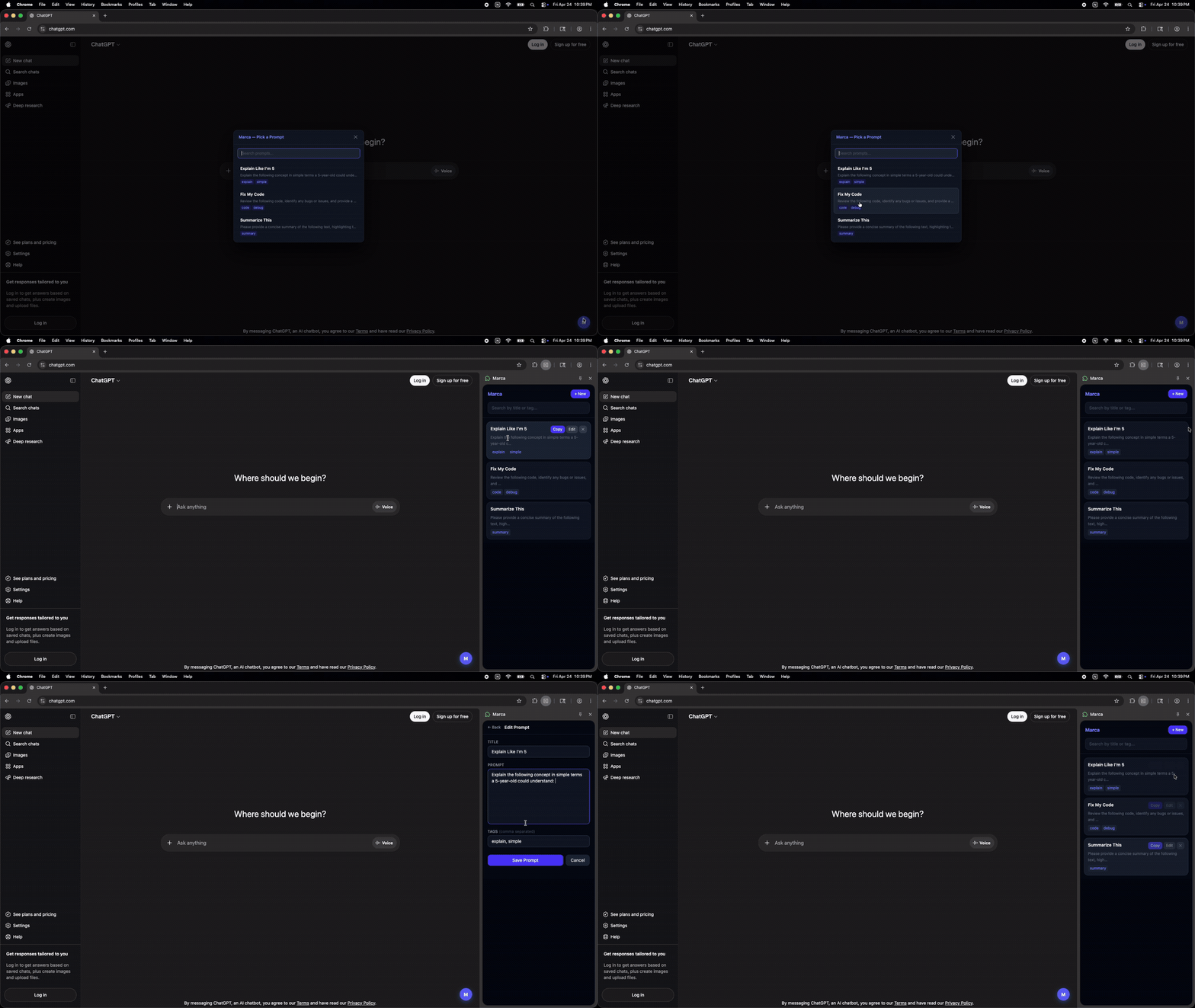
01 / MARCA

April 2026 · First working prototype

Marca prototype showing a prompt picker, direct insertion into ChatGPT, the saved prompt library, and prompt editing
My engineering partner sent me this first working build shortly after we began exploring the idea. The prototype proved that reusable prompts could live directly inside an AI workflow instead of requiring users to return to a separate document.

WHAT THE PROTOTYPE ALREADY DID

  1. 01
    QUICK PROMPT ACCESS

    A lightweight prompt picker surfaced saved prompts without leaving ChatGPT.

  2. 02
    REUSE IN CONTEXT

    Selecting a saved prompt inserted it directly into the active AI conversation.

  3. 03
    PROMPT LIBRARY

    The full Marca sidebar exposed a reusable collection of saved prompts inside the browser.

  4. 04
    EDIT + SAVE

    Users could open a prompt, edit its content and metadata, and save changes from the extension.

From identity to interaction

The identity changed.
So did the interaction.

If PromptGo was supposed to reduce friction, the experience had to prove it.

The next design question became:

How little can stand between “I need that prompt” and “it’s ready to use”?
~8 actions2 clicks

The product promise was no longer just “store your prompts.”

It was: get the right prompt back into the workflow with as little friction as possible.

Orange, with intention

I chose orange and white to stand out against the neutral AI interfaces I observed. Orange conveyed the energy and speed I wanted the product to express.

Designed for the toolbar

The original logo combined a P, bookmark, star, and overlapping shapes. The finer details disappeared at small sizes. The final design retains the outlined P, paired with a white bookmark containing >_. Together, these connect the PromptGo name, saving, and command prompts.

Early logo explorations · AI inspiration + 2 iterations
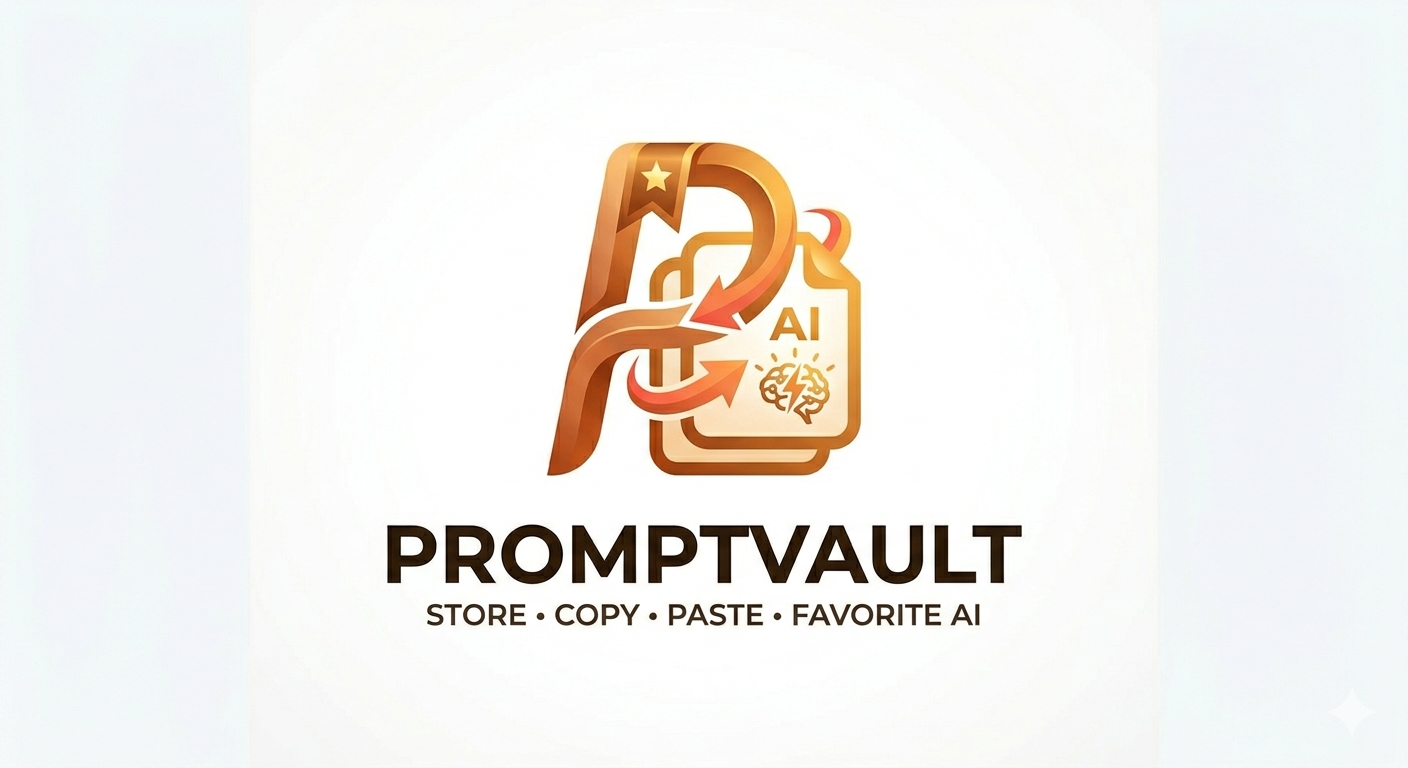
AI-generated PromptVault inspiration showing a dimensional orange P, starred bookmark, arrows, and document shapes

AI-generated inspiration

I used this image as inspiration for the logo. It explored a P, a starred bookmark, document shapes, and warm orange tones—elements I revisited in my subsequent iterations.

First logo iteration: large outlined P, starred bookmark, and overlapping copy shapes on an orange circle

Iteration 1

A large P, starred bookmark, and overlapping copy shapes on a circular orange background.

Second logo iteration: hand-drawn P and starred bookmark overlapping a document shape on an orange background

Iteration 2

A hand-drawn exploration combining the P and bookmark with a document shape.

Before · PromptVault

Overlapping shapes, a bookmark, and a star. Fine details became harder to distinguish at small sizes.

New PromptGo logo with an outlined P and command-prompt bookmark

After · PromptGo

Retains the outlined P, simplifies the surrounding shapes, and introduces >_ within the bookmark.

At 32 px
Before
New logo at 32 pixelsAfter

Simplifying for the toolbar. The rebrand gave me an opportunity to reduce visual complexity while preserving the connection to saving prompts.

An extension logo needs to remain recognizable in a small browser toolbar.

05 / TESTING & ITERATION

Then I asked someone to break it.

I gave an early PromptVault build to my roommate and asked her to explore it independently instead of following the intended workflow.

Watching someone else use the product exposed things I had stopped noticing: hidden functionality, confusing interactions, unexpected navigation patterns, and small usability problems that compounded quickly.

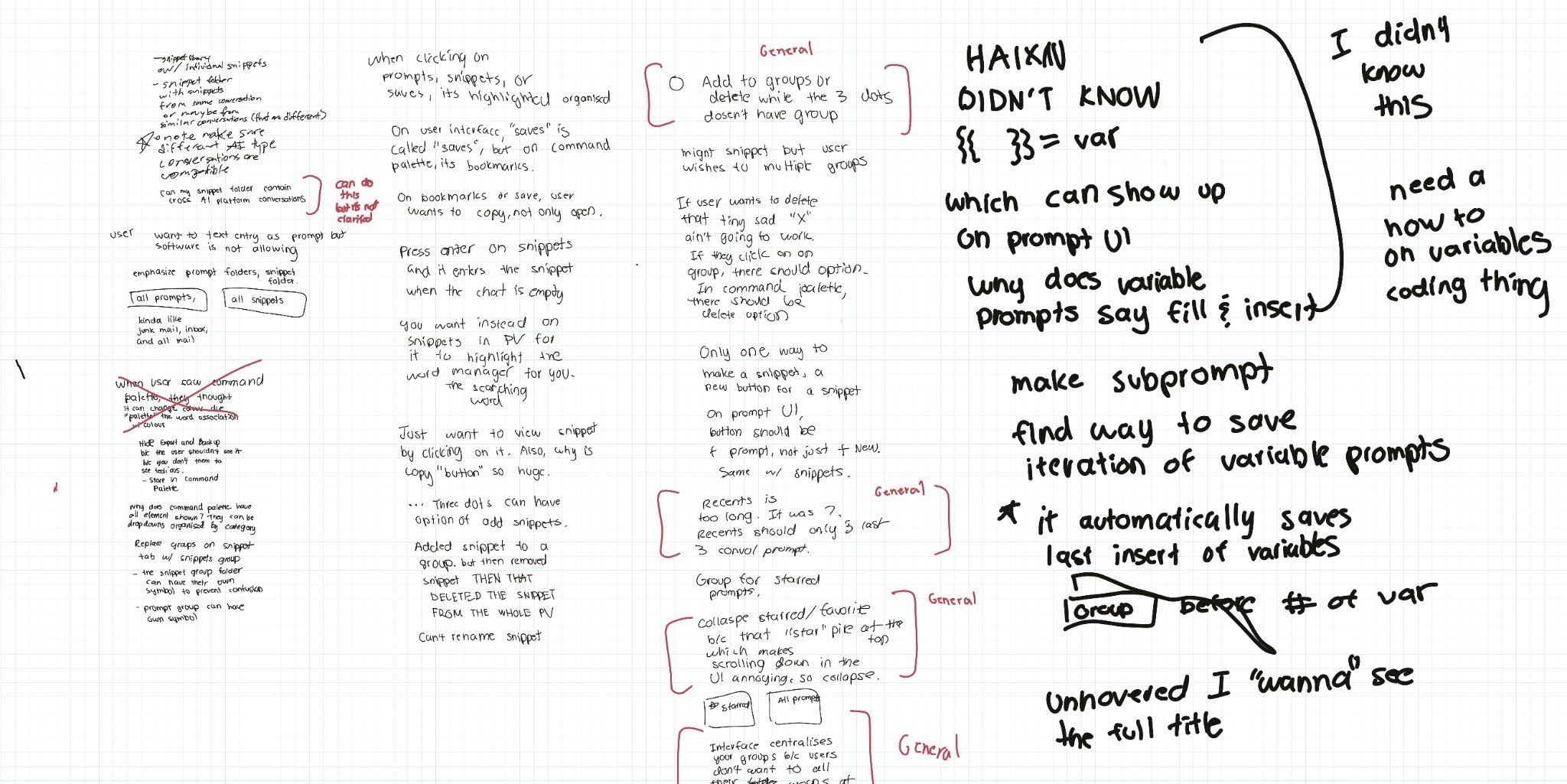
RAW USABILITY NOTES · MAY 2026

Raw notes from a May 2026 PromptVault usability session
I documented confusion, unexpected behavior, discoverability problems, and friction as they happened.
OBSERVE → SYNTHESIZE → SPECIFY

The notes were messy. The next challenge was turning them into something engineering could act on.

FIRST PRD · MAY 2026

Turning observations into requirements.

After the usability session, I translated the raw notes into my first product requirements document: a 21-slide proposed-improvements deck covering bugs, discoverability, interaction states, information architecture, and feature refinements.

01 / 21
01 / 21
First PRD, slide 1 of 21
01 / 21

“It wasn’t a textbook PRD. It was my first one.”

I mixed bugs, UX observations, feature ideas, assumptions, and proposed fixes more than I would today. But it marked an important transition: I stopped treating feedback as commentary and started translating it into decisions engineering could act on.

The artifact was imperfect. The learning was useful.

A MORE DELIBERATE SECOND PRD

From builder’s rush to product discipline.

The first PromptVault prototypes had the energy of two enthusiastic builders working at midnight: move fast, try things, ship something, and see what happens.

That energy helped us turn an idea into a real product quickly. It also left behind the kinds of mistakes that appear when speed outruns deliberation — fragile interactions, inconsistent states, unclear deletion behavior, and reliability problems across the core experience.

By the time I wrote the stabilization PRD, my approach had changed.

I focused the next phase around two priorities:

  1. Protect the right core features instead of continually expanding the product.
  2. Strengthen the underlying reliability, state behavior, and product structure left behind by the prototypes.

The second PRD deliberately narrowed scope. Instead of treating every possible improvement as equally important, I separated critical reliability work from future product ideas, prioritized data integrity and workflow blockers, and defined clearer acceptance criteria and release conditions.

This was less about making the document look more sophisticated and more about bringing maturity to the product itself.

View full stabilization PRD ↗
“The prototype was built with enthusiasm. The stabilization release was approached with discipline.”

Looking back, this PRD represents a change in my craft. The early product reflected the instincts of an enthusiastic beginning product builder. This document reflects my transition toward practicing product management more deliberately: protecting the core experience, deciding what not to build, defining a quality bar, and bringing more maturity to the product before asking engineering to expand it.

FIRST PRD“Everything I notice that we could improve.”
STABILIZATION PRD“What matters now, what can wait, and what must be true before we ship.”

FROM REQUIREMENTS TO EXECUTION

The PRD told us what mattered. Jira made those priorities manageable.

The new PRD told us what mattered. Tools like Jira made keeping track of those priorities executable and manageable.

Some issues threatened user-created data and product trust. Others were smaller interaction defects. They did not all deserve equal priority, but together they contributed to whether PromptGo felt dependable.

The goal was no longer simply to fix bugs. It was to establish a quality bar.

PROTECT THE DATA

PG-14 BugIn Progress

Prevent simultaneous storage actions from overwriting user data

Potential simultaneous storage mutations could overwrite newer user changes.

Description

Saving, deleting, or organizing content uses separate read-then-write operations. If two actions happen close together, the last operation may save an older copy of the library and erase the other change.

Done when

  • Simultaneous save and organize/delete scenarios preserve both intended changes.
  • Storage watchers cannot cause stale data to be written back.
  • Regression coverage exists for competing updates.

PROTECT THE WORKFLOW

PG-30 BugDone

Add a safe Remove from group action for prompts and snippets

RC1 revealed that grouped prompts and snippets could not be safely removed from a group while preserving the underlying item.

Description

During PromptGo 1.0.1 RC1 functional QA, a grouped item's menu exposed actions such as Duplicate/Edit/Delete or View/Go to source/Delete, but no way to remove the item from its group without deleting the underlying content.

Acceptance criteria

  • Show Remove from group only when the item belongs to a group.
  • Support both prompts and snippets.
  • Clear only group membership through the existing storage mutation path.
  • Do not delete or otherwise modify item content or metadata.

PROTECT THE EXPERIENCE

PG-9 BugIn Review

Fix double highlight in command palette

Two highlighted command-palette rows made product state ambiguous.

Description

Hovering over a command-palette item can show two highlighted rows: the item under the mouse and cmdk's separately selected item.

Acceptance criteria

  • Only one command-palette row is highlighted at a time.
  • Mouse and keyboard navigation both update the same highlight.
  • Selected-row text remains clearly readable.

FROM TICKETS TO RELEASE

A fix was not finished just because the code changed.

The Jira tickets made individual problems actionable. The Confluence release-readiness plan connected those fixes back into the product as a whole.

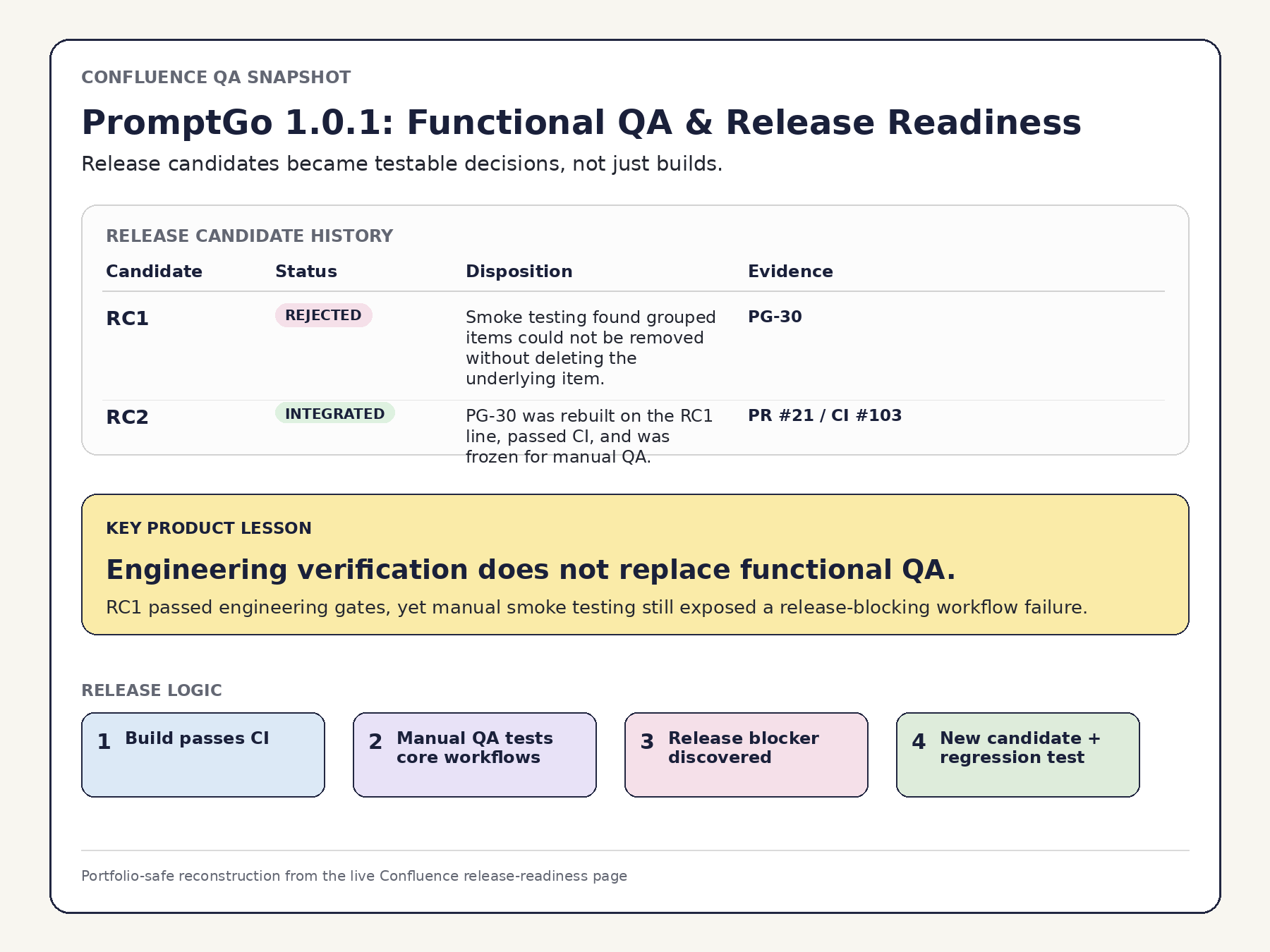
RC1 passed the automated engineering gates. But manual smoke testing revealed something those checks had not caught: PromptGo was missing a basic ungroup workflow.

Users could place prompts and snippets into groups, but there was no way to remove them from a group while preserving the underlying item.

That gap became PG-30: add a safe “Remove from group” action, preserve the saved content and metadata, and verify the behavior in the next release candidate.

Portfolio-safe reconstruction of the Confluence release-readiness page showing RC1 rejected after smoke testing and an RC2 follow-up
PromptGo 1.0.1: Functional QA & Release Readiness · Portfolio-safe reconstruction of the release-readiness page.
“A build can compile successfully and still not deserve to reach users.”
RC1Engineering checks passed
MANUAL SMOKE TESTNo Ungroup / “Remove from group” action existed
PG-30Add a safe Remove from group action while preserving the underlying item
RC2New candidate + targeted retest

The PRD defined what mattered.
Jira made the work traceable.
Confluence helped turn that work into a release decision.

From tickets
to release.

The Jira tickets made individual problems actionable. The Confluence release-readiness plan connected those fixes back into the product as a whole.

RC1 passed the automated engineering gates. But manual smoke testing revealed something those checks had not caught: PromptGo was missing a basic ungroup workflow.

Users could place prompts and snippets into groups, but there was no way to remove them from a group while preserving the underlying item.

That gap became PG-30: add a safe “Remove from group” action, preserve the saved content and metadata, and verify the behavior in the next release candidate.

RC1 → RC2

RC1
Engineering checks passed

MANUAL SMOKE TEST
No Ungroup / “Remove from group” action existed

PG-30
Add a safe Remove from group action while preserving the underlying item

RC2
New candidate + targeted retest

Engineering checks and targeted retest

Engineering checks confirmed the release candidate; manual smoke testing then tested the core interaction paths those gates did not cover. RC2 retested the safe Remove from group behavior.

06 / PRODUCT MATURATION

From building fast
to building deliberately.

The first generation of PromptGo came out of something close to hackathon energy: two enthusiastic builders moving quickly, experimenting, and turning an idea into a working product.

That speed mattered. It proved the concept could exist.

But as PromptGo matured, the standard changed. A working prototype was no longer enough. The product needed stronger core workflows, more reliable behavior, clearer release criteria, and a higher bar for what deserved to reach users.

CAN WE BUILD THIS?
CAN USERS TRUST WHAT WE BUILT?

A small feature that represented a larger change.

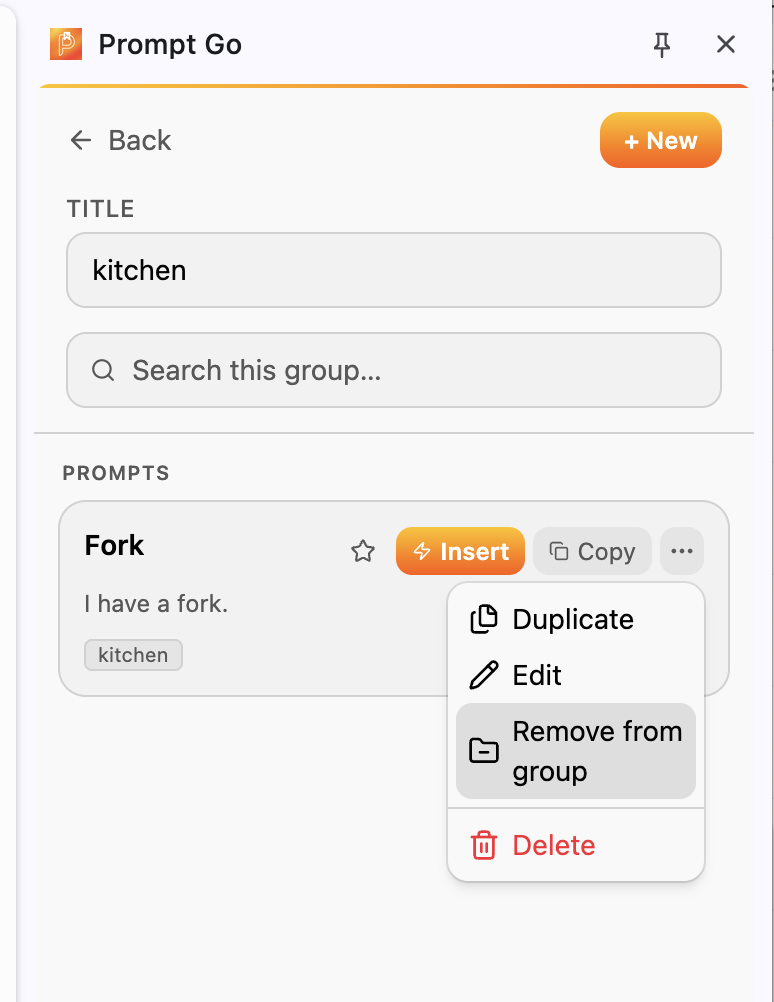
PromptGo group view showing the Remove from group action in the item menu
The later release candidate added a safe way to remove an item from a group while preserving the prompt or snippet itself.

EARLIER BUILD

Grouped prompt or snippet

No “Remove from group” action

LATER RELEASE CANDIDATE

Grouped prompt or snippet

“Remove from group” preserves the underlying item

On the surface, this was one missing workflow.

But it represented the difference between the two generations of PromptGo.

The earlier product proved that we could save, organize, and reuse AI work. The later product demanded that those workflows behave predictably enough to deserve user trust.

The same philosophy applied beyond Ungroup: protecting saved data, tightening interaction states, defining acceptance criteria, running structured QA, and treating a release candidate as something that had to earn approval.

The product matured. So did my role.

Early PromptGo taught me how exhilarating it is to turn an idea into something real. It was amazing to live off the high of building alongside a cofounder and friend.

But as products mature, the work changes. The later stages taught me the less glamorous, but more soulful and disciplined side of product management: slowing down, narrowing scope, protecting what already works, identifying what could hurt users, and refusing to confuse “built” with “ready.”

The first generation was driven by builder enthusiasm. The second was shaped by product discipline — the desire to refine not just the product, but the craft of building it well.

NEXT → OUTCOME

What actually shipped, what changed, and what still remained unresolved.

07 / OUTCOME SO FAR

The project became a product.
The product is still becoming.

PromptGo began as a fast experiment around a problem I personally experienced: useful prompts were easy to create and surprisingly annoying to find and reuse.

That original problem is now meaningfully better for me. The product gives me a faster, more organized way to save, find, and reuse prompts than my old workflow of scattered documents and manual copy-pasting.

The first public version — still branded PromptVault — is available for strangers to install from the Chrome Web Store.

The newer PromptGo generation is not public yet. Its focus has shifted away from expanding the feature set and toward something more fundamental: trust.

Safe “Remove from group” behavior, stronger protection of saved data, and more deliberate release testing reflect the product becoming less like a project we built and more like a product we are responsible for.

What exists today

PUBLIC PRODUCT

The original PromptVault build is publicly installable.

CORE PROBLEM SOLVED

Saving, organizing, finding, and reusing prompts is meaningfully easier than my original workflow.

NEXT GENERATION

PromptGo’s current release-candidate work focuses on reliability, data safety, and product trust.

The PromptGo rebrand and newer release-candidate generation have not yet replaced the public Chrome Web Store build.

The next problem is adoption.

PromptGo has not yet seriously invested in acquisition, onboarding, or discoverability.

I have qualitative signals that the problem resonates: someone found the product independently useful, and research participants described the kind of fragmented prompt workflows PromptGo was designed around.

But I do not yet have enough behavioral data to make strong claims about retention or product-market fit.

Rather than immediately adding more features, I would focus on making the basic product as good as possible:

UI qualityonboardingsavingsnippetsorganizationsearchdeployment
What else can we add?
How good can the core experience become before we ask users to learn anything more?

Not every opportunity deserves a feature.

The snippets feature originally came from my engineering collaborator’s desire to save useful parts of AI conversations.

That problem may be worth pursuing further.

But one of the biggest things PromptGo taught me is that a problem is an opportunity, not automatically a roadmap item.

Not every opportunity needs a solution.
Not every solution deserves engineering time.

If I continued investing in PromptGo, I would resist the long list of “interesting” features we explored early on and concentrate on the things users consistently valued:

organizationspeedsearchabilityease of reuse

What I would measure next

ACTIVATION

Do new users reach the core workflow?

RETENTION

Do they come back and reuse the product?

FIND → INSERT TIME

How quickly can someone move from “I need that prompt” to having it ready in their AI workflow?

That last metric matters because PromptGo’s product thesis is built around convenience and speed. Research showed users already had ways to store information. The opportunity was reducing the friction of getting useful work back when they needed it.

April me would have just built it.

Earlier in the project, my instinct was simple: if something sounded useful, build it.

I think differently now.

Ask questions first. Be critical. Look for behavioral evidence. If direct user data is limited, search for parallel evidence in research, adjacent products, or existing behavior. Document the reasoning. Make the decision traceable.

Structure does not remove creativity from product building. It gives creativity somewhere useful to go.

And PromptGo isn’t finished.

PromptGo is still a product I want to grow.

It is also my first product — and therefore something larger than the extension itself. It has become a learning vehicle for how I want to practice product management: curious enough to explore opportunities, disciplined enough to reject them, and structured enough to understand why.

I hope PromptGo is the beginning of a much longer career building products, businesses, and eventually things far larger than this first extension.

For now, the work continues.

APRIL 2026Can we build it?
SEPTEMBER 2026Should we build it? Is it ready? Can users trust it?
NEXTWill users adopt it, return to it, and find enough value to keep it?

08 / RESULTS & ITERATIONS

A published product.
A continuing learning process.

First version published

The first version reached publication, and work is underway on the second release. Subsequent work has included safer group management, a simplified identity, and attention to keyboard interactions.

The next evidence to collect

My evidence is strongest around delivery, research findings, and specific product improvements. Measured gains in retrieval speed, retention, and productivity have not yet been established.

09 / REFLECTION & NEXT STEPS

A huge part of the job is deciding what to trim, defer, or simplify.

Building PromptGo took me through ideation, discovery, prototyping, development, testing, and launch. Each release creates new questions. Deferring the prompt rater made that lesson concrete: an appealing feature could wait while I addressed more fundamental needs.

I learned to treat assumptions as hypotheses and revisit them using user feedback and product data.

Release V2

Complete the next product iteration.

Improve UI & UX

Address friction in the core experience.

Explore Markdown

Test whether a storage solution fits the workflows I observed.